
close
+44 (0) 1392 330 292
sales@edworthymedia.co.uk

At a Glance Awarded Best Thunderbolt Dock 2024 by Tom’s Guide and a part of the Intel Engineered for Evo program, this 13 port Thunderbolt certified, dual 4K 60Hz HDMI, 8K-ready dock offers up to 100W Power Delivery (96W Certified), 40Gbps Thunderbolt 4 upstream and downstream ports
Dual 4K Prepare for productivity when you dedicate a screen to your current project and a second screen for email. Both will look crisp and clear on this Thunderbolt hub at up to 4K 60Hz via 2x HDMI ports, or one screen up to 8K via 1x Thunderbolt port
Thunderbolt Dock The dock is Thunderbolt 4 certified, and that comes with some powerful perks. With a downstream front Thunderbolt 4 port, enjoy up to 40Gbps data transfer, 15W of charging for your phone or tablet, or drive a single 8K display
Works With Thunderbolt docking station is fully compatible with Windows 10 or later systems that support Thunderbolt 4 or USB4. On Mac systems, dual display is only supported on M1 Pro/Max, M2 Pro/Max, and M3 Pro/Max systems
A “do-it-all” dock, the Thunderbolt Certified TBT4-UD5 Plugable Docking Station was awarded The Best Thunderbolt Docking Station by Tom’s Guide (Tom's Guide, July 23rd, 2024), as well as verified for the Intel Engineered for Evo program. It stands out as a versatile and powerful hub for modern workspaces. Its robust design includes an array of 13 ports, catering to a wide range of connectivity needs.
Starting with the 40Gbps Thunderbolt 4 host port, this HDMI docking station offers plenty of bandwidth to support two HDMI ports, each capable of driving dual 4K 60Hz displays. A downstream 40Gbps Thunderbolt 4 port is also included to provide high-speed connectivity for advanced Thunderbolt-based applications, such as fast storage devices. Use it to alternatively charge your phone or tablet with up to 15W of power or power an external display such as a USB-C monitor at up to 8K
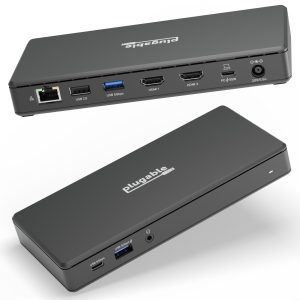
In addition to Thunderbolt 4 to HDMI display options, the TBT4-UD5 boasts a USB-C port with a 10Gbps transfer rate, ideal for quick file transfers and efficient data management. There are also 4x USB ports (2x 10Gbps, 2x 5Gbps), perfect for connecting a variety of peripherals like keyboards, mice, and external drives. Throw in SD and Micro SD slots, a combo audio jack, Gigabit Ethernet, and a slot for a K lock, and this setup ensures that users can create a powerful and integrated workstation.
Speaking of power, the TBT4-UD5 Thunderbolt and USB4 dock packs it in with up to 100W Power Delivery (96W certified) — more than enough for most power-hungry laptops. Especially useful in business and education environments, the Plugable TBT4-UD5 Docking Station delivers exceptional functionality and convenience.
It’s worth noting on Mac systems, dual display is only supported on M1 Pro/Max, M2 Pro/Max, and M3 Pro/Max systems. Base model M1, M2, and M3 systems will only support one extended display.
System Requirements Host computer with a built-in Thunderbolt 4 or USB4 port running Windows 10 and later or macOS 11 and later
Drivers Typically no driver installation is necessary on the host computer in order to use the TBT4-UD5. On Windows, it may be necessary to manually install an Ethernet adapter driver to ensure the best performance.
Mac Configuration Apple Mac systems with an Apple processor must have an M1 Pro/M1 Max, M2 Pro/M2 Max or M3 Pro/M3 Max processor in order to use dual displays. Base M1, M2, or M3 Macs only support a single display.
Display Capabilities The TBT4-UD5 has two built-in HDMI video outputs each supporting up to a maximum 4K resolution at up to a maximum 60Hz refresh rate. Dual display capability is dependent on the host system’s external display capability. Up to 8K video is supported via downstream front Thunderbolt port (total maximum of two displays possible).
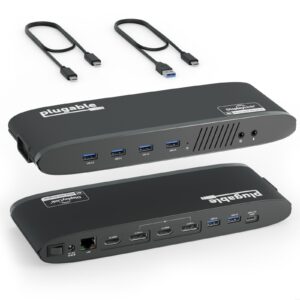
In the Box 1x Plugable TBT4-UD5 Docking Station 1x 1.0m 40Gbps 240W Thunderbolt 4 Cable 1x Quick Start Guide 1x Power supply 1x Power cable
No specifications are currently available for this product.
Only logged in customers who have purchased this product may leave a review.

Reviews
There are no reviews yet.